Top AI Tools for Meeting Minutes: A Comparison
Every cell in the table below comes from the vendor's own published page, captured on 1 September 2026. Nothing here is a benchmark, a test result or an accuracy claim — those are the numbers most "best tool" pages invent, and none of these vendors publishes a comparable one.
Memora is in the comparison because it is one of the options a Malaysian team would look at. It is also our product, and it is labelled that way in every place it appears.
Three narrower pages sit under this one: free tiers and their limits, Otter against Microsoft Teams Copilot, and cloud versus self-hosted cost.
How to compare these tools without being misled
Three rules make this comparison honest, and they are the reason it looks different from most.
Only published figures. Every price and feature below is what the vendor's own page displayed on 1 September 2026. Pricing pages change without notice, and several of these are promotional. Re-check before you buy.
No accuracy claims. None of these vendors publishes a comparable, independently measured word error rate for the languages and room conditions a Malaysian team actually uses. Any page that ranks them by a single accuracy percentage — including older pages in this library — is quoting a number that cannot be verified against a source. This page does not rank them on accuracy at all.
Billing shape matters more than headline price. Otter, Fireflies, Microsoft and Google all price per user or per seat. Memora prices per organisation. Which is cheaper depends entirely on your headcount, so a single "cheapest" answer does not exist.
What the vendors *do* publish, and what is therefore comparable, is billing model, plan limits, supported languages and the platforms each tool records from.
Published prices, captured on 1 September 2026
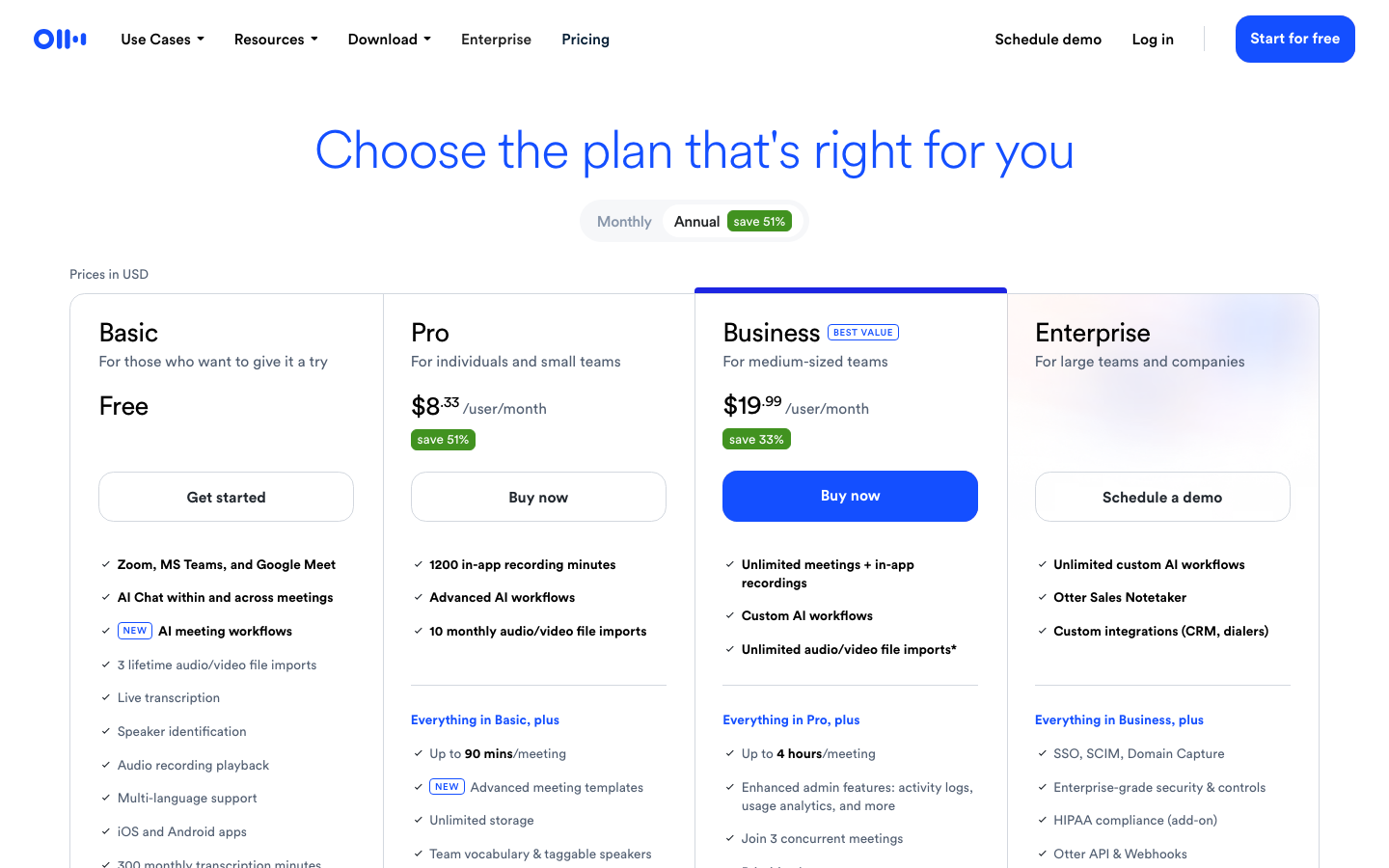
Otter.ai — pricing page, annual view, prices shown in USD. Basic is free. Pro is $8.33 per user per month with a "save 51%" badge on the annual toggle. Business is $19.99 per user per month with "save 33%". Enterprise is quote-only through a demo request.
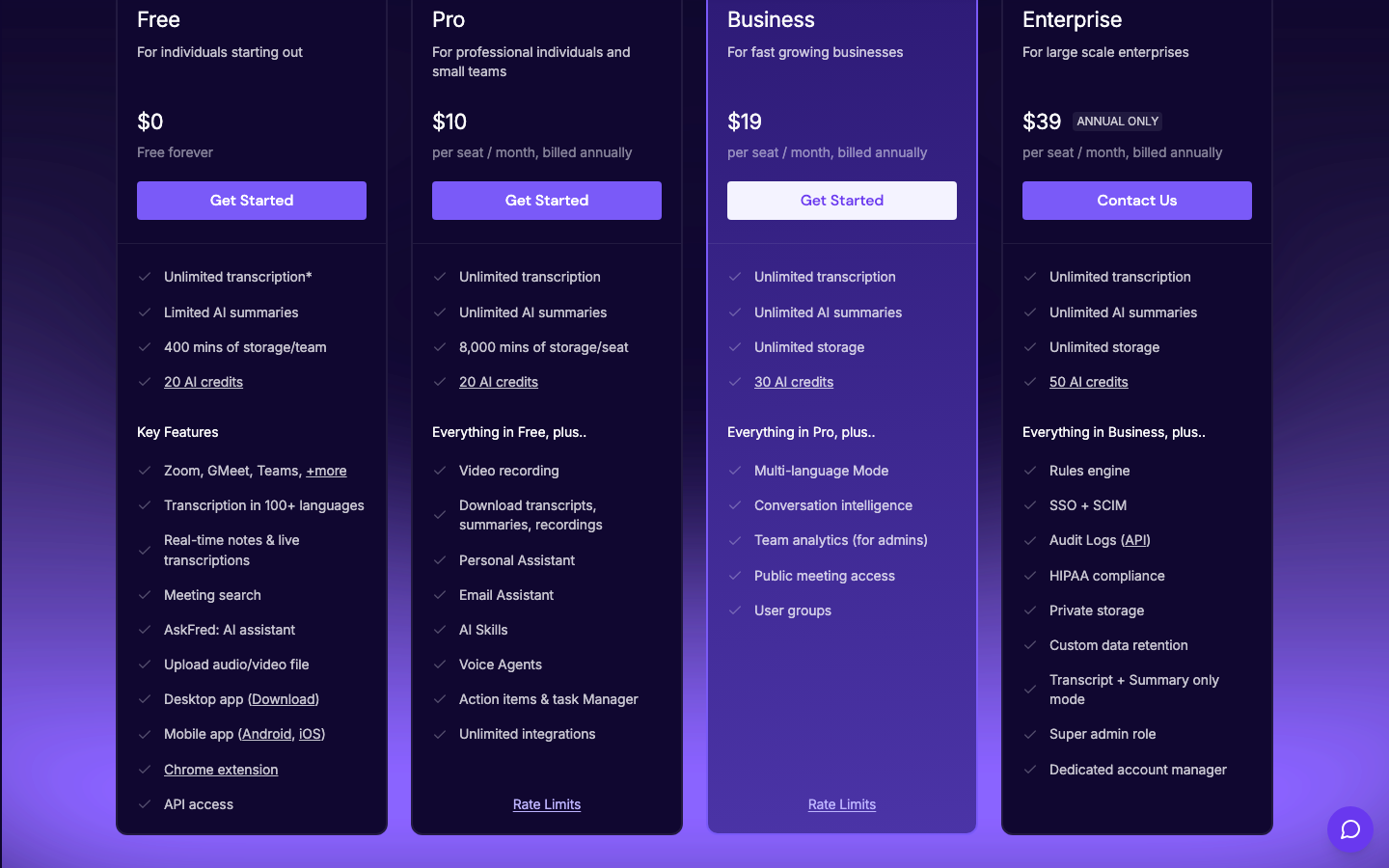
Fireflies.ai — pricing page, annual view. Free is $0 "free forever". Pro is $10 per seat per month billed annually. Business is $19 per seat per month billed annually. Enterprise is $39 per seat per month, marked annual only.
Microsoft 365 Copilot — business pricing page, "Plans with Teams" and "Yearly" selected, US page in USD. Microsoft 365 Business Premium with Copilot is $32.00 user/month paid yearly. Business Standard with Copilot is $23.50. The Microsoft 365 Copilot Business add-on to an existing plan is shown at $18.00, reduced from $21.00. All are annual subscriptions that auto-renew.
Google Workspace — pricing page served for Malaysia, annual commitment, prices in MYR. Business Starter is RM29.20 per user per month, discounted to RM14.60 for the first 12 months. Business Standard is RM58.40, discounted to RM35.04. Business Plus is RM91.70. Enterprise is quote-only. Google states the introductory price applies to new customers only, for the first 20 users, for 12 months.
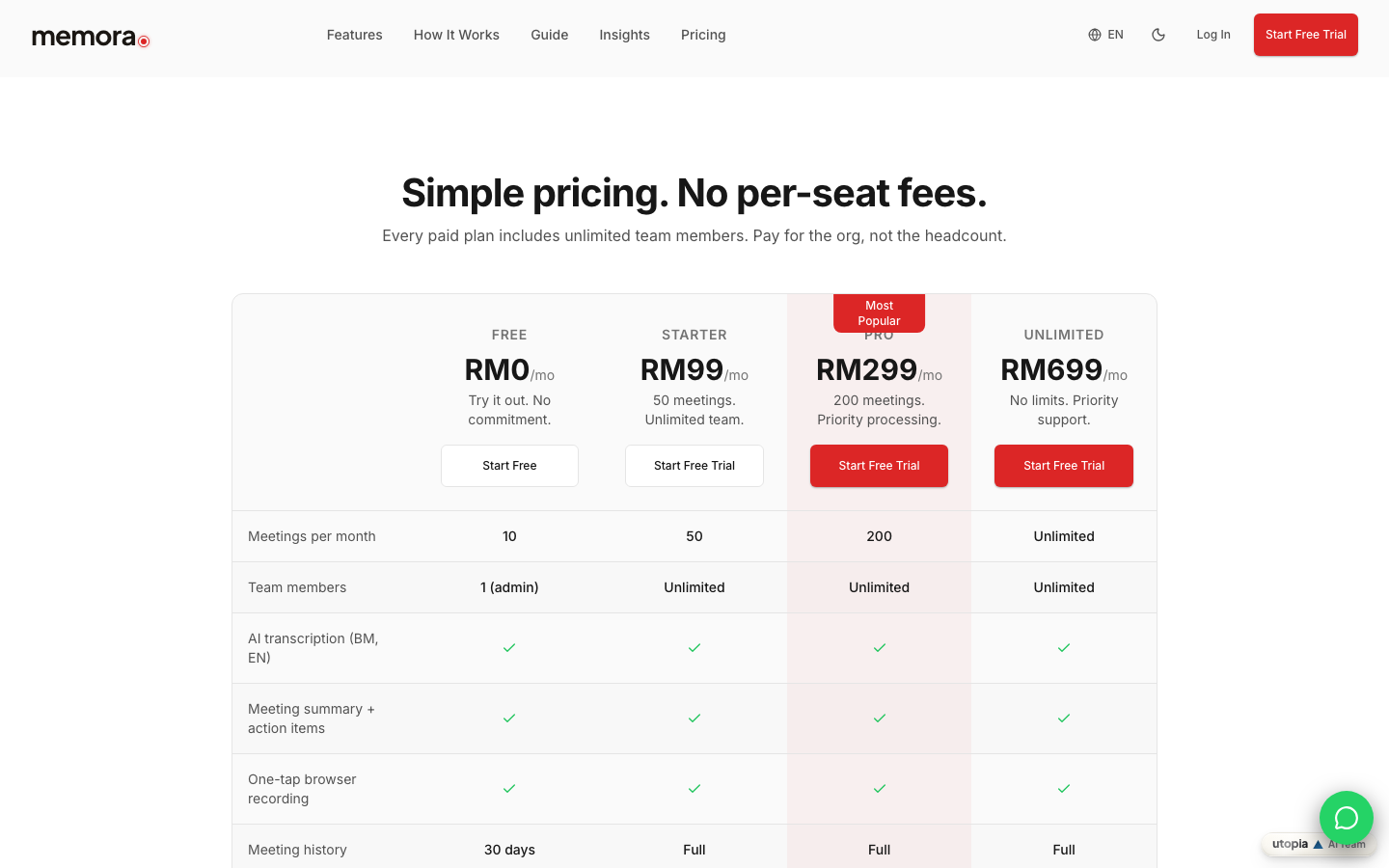
Memora (our own product) — pricing page, in MYR. Free is RM0 per month. Starter is RM99 per month. Pro is RM299 per month. Unlimited is RM699 per month. These are per-organisation prices, not per seat.
What the free tiers actually include
Free tiers are where the differences bite, because each vendor caps a different thing.
Otter's Basic plan lists 300 monthly transcription minutes, three lifetime audio or video file imports, live transcription, speaker identification and recording from Zoom, Microsoft Teams and Google Meet.
Fireflies' Free plan lists limited AI summaries, 400 minutes of storage for the whole team, 20 AI credits, transcription in over 100 languages and a two-hour recording limit. Its paid tiers raise storage to 8,000 minutes per seat (Pro) and then unlimited (Business and Enterprise), and the recording limit to three and four hours respectively.
Memora's Free plan lists 10 meetings a month, a single admin user and 30 days of meeting history; paid plans list unlimited team members and full history.
Microsoft and Google do not offer a free AI meeting-notes tier in the same sense. Both attach the capability to a paid plan, so the comparison there is not "free versus paid" but "already in your subscription or not".
A fuller treatment of the free tiers and where they break down lives in Best Free AI Meeting Notes Apps.
Bundled versus standalone: Microsoft 365 and Google Workspace
If your organisation already pays for Microsoft 365 or Google Workspace, the AI note-taker may be a licence change rather than a new vendor.
On the Microsoft side, Copilot in Teams summarises key discussion points including who spoke, suggests action items and answers questions during or after a meeting. The catch is documented on the same page: to prompt Copilot about the meeting after it ends, live transcription must have been on during it, and Copilot will not work in meetings hosted outside your own organisation. Microsoft's page also tells users to verify AI-generated results.
On the Google side, "Take notes for me" requires an eligible Google Workspace edition or Google AI plan, produces notes organised in Google Docs, gives late joiners a "Summary so far", and emails the organiser a recap link. Google states plainly that a summary can be incomplete, inaccurate or not generated.
Bundled AI is usually the cheaper marginal decision and the harder governance decision, because it changes the settings for everyone on the tenant at once. The head-to-head on that pairing is in Otter against Microsoft Teams Copilot.
Language coverage is the constraint most Malaysian teams hit first
This is the one place where the published facts separate the options sharply, and it has nothing to do with price.
Google's current help page lists "Take notes for me" as available in English, French, German, Italian, Japanese, Korean, Portuguese and Spanish, and adds that the feature supports one language at a time and that multiple languages spoken in the same meeting are not currently supported. Bahasa Melayu is not on that list.
Microsoft's Teams transcription documentation lists a much longer set of supported transcription languages, and Malay (Malaysia) is on it.
Fireflies' pricing page advertises transcription in over 100 languages, with a multi-language mode listed from its Business plan.
Otter's Basic plan lists multi-language support without naming the set on the pricing page itself.
Memora's pricing page lists AI transcription in BM and EN on every plan, and its staff guide asks the user to choose EN or BM for the meeting.
If your meetings switch between Bahasa Melayu, English and a Chinese dialect inside a single hour, none of these pages promises that will work. Test it on a real meeting before committing.
Where Memora sits — and this is our own product
Disclosure first: Memora is built by Utopia, the publisher of this page. Treat the following as a description of what our public pricing page states, not as a recommendation over the alternatives above.
Memora's pricing page bills per organisation rather than per seat: RM0, RM99, RM299 and RM699 a month, with meeting quotas of 10, 50, 200 and unlimited respectively, and unlimited team members on every paid plan. AI transcription is listed for BM and EN across all plans. Meeting history is 30 days on Free and full on paid plans.
The practical difference is arithmetic, not quality. Per-seat pricing scales with headcount; per-organisation pricing scales with meeting volume. A three-person team with heavy meeting load and a thirty-person team with light meeting load land on opposite answers.
Memora also records in the browser rather than by joining a call as a bot, which is why it is usually the option under discussion for meetings held in a room. That workflow is covered in How AI Can Assist with Physical Meeting Minutes.
Pick by constraint, not by verdict
There is no winner here, and any page that names one without sourcing every criterion is guessing.
Work it the other way round. Write down your binding constraint first, then read only the rows that answer it.
- Already on Microsoft 365 or Google Workspace, meetings are online. Price the licence upgrade before you price a new vendor.
- Meetings are mostly in a room, or with people outside your tenant. Bot-based and tenant-bound tools cover this poorly; look at what records locally from a device.
- Bahasa Melayu matters. Check the supported-language list on the vendor's page rather than the marketing copy.
- Headcount is large and meeting volume is low. Per-seat pricing is the expensive shape.
- Meeting volume is high and the team is small. Per-organisation pricing is the expensive shape to avoid the other way round.
- Retention or storage is a real requirement. Compare storage caps and history windows, which is where the free tiers differ most.
Whichever you choose, prices and features on all five pages changed within the last year. Re-check on the vendor's own page on the day you buy. For cost modelling over a full year, including self-hosting, see AI Meeting Notes Pricing: Cloud vs Self-Hosted.
Published plans and limits, captured 1 September 2026 (verify before you buy)
| Tool | Billing shape | Published entry and mid-tier price | Languages, as published | What the vendor's page emphasises |
|---|---|---|---|---|
| Otter.ai | Per user | Basic free; Pro US$8.33/user/month; Business US$19.99/user/month (annual view, prices shown in USD) | "Multi-language support" listed on Basic; set not named on the pricing page | 300 monthly transcription minutes on Basic; up to 90 min/meeting on Pro, up to 4 hours on Business; Zoom, MS Teams and Google Meet |
| Fireflies.ai | Per seat | Free US$0; Pro US$10/seat/month; Business US$19/seat/month; Enterprise US$39/seat/month, annual only (billed annually) | "Transcription in 100+ languages"; multi-language mode listed from Business | 400 min storage per team on Free, 8,000 min per seat on Pro, unlimited above; 2 to 4 hour recording limits by tier |
| Microsoft 365 Copilot | Per user | Copilot Business add-on US$18.00 user/month paid yearly (from US$21.00); Business Standard with Copilot US$23.50; Business Premium with Copilot US$32.00 | Teams transcription language list includes Malay (Malaysia) | Summaries, action items and Q&A in Teams; needs live transcription for after-meeting use; not available in externally hosted meetings |
| Google Workspace with Gemini | Per user | Business Starter RM29.20/user/month (RM14.60 intro); Standard RM58.40 (RM35.04 intro); Plus RM91.70, annual commitment, Malaysia pricing page | "Take notes for me" in 8 languages, one language at a time; Bahasa Melayu not listed | Notes organised in Google Docs, "Summary so far", recap emailed to the organiser; summary may be incomplete or inaccurate |
| Memora (our own product) | Per organisation | Free RM0; Starter RM99/month; Pro RM299/month; Unlimited RM699/month | AI transcription listed for BM and EN on all plans | 10 / 50 / 200 / unlimited meetings per month; unlimited team members on paid plans; browser recording rather than a meeting bot |
Before you commit to any of them
- Open the vendor's own pricing page today — every figure here was captured on 1 September 2026
- Check whether the price shown is the annual view, the monthly view or an introductory offer
- Multiply per-seat pricing by your real headcount, not by the pilot group
- Confirm the languages your meetings actually use appear on the vendor's supported list
- Confirm the tool can record the meetings you actually hold: online, in a room, or on someone else's tenant
- Check the storage cap and history window, not just the meeting count
- Run one real meeting on the free tier before paying anything
- Compare the generated draft against the recording yourself; treat vendor accuracy marketing as unverified
- Decide who reviews and approves the minute before it is distributed
- Re-check prices on the day you buy
FAQ
Which AI tool produces the most accurate meeting minutes?
There is no sourced answer to that question, so this page does not give one. None of these vendors publishes a comparable, independently verified accuracy measurement for the languages and room conditions Malaysian teams use. Both Microsoft and Google tell users to verify the generated output instead of relying on it, which is the more useful signal: run your own meetings through a free tier and compare the draft against the recording.
Is per-seat or per-organisation pricing cheaper?
It depends only on your headcount and meeting volume. Otter, Fireflies, Microsoft and Google all price per user or per seat, so their cost scales with team size. Memora, our own product, prices per organisation at RM0, RM99, RM299 and RM699 a month, so its cost scales with meeting volume instead. Do the arithmetic for your own numbers rather than accepting either shape as cheaper.
Can any of these handle Bahasa Melayu?
The published lists differ. Google's help page lists "Take notes for me" in eight languages — English, French, German, Italian, Japanese, Korean, Portuguese and Spanish — and Bahasa Melayu is not among them. Microsoft's Teams transcription language list does include Malay (Malaysia). Fireflies advertises transcription in over 100 languages. Memora lists AI transcription in BM and EN on every plan. Google also states its feature supports one language at a time, so mixed-language meetings need testing on any platform.
Should I just use the AI already included in Microsoft 365 or Google Workspace?
Often it is the cheapest marginal step, and it is worth pricing first. Two documented limits decide whether it is enough: Microsoft states Copilot will not work in meetings hosted outside your own organisation and needs live transcription for after-meeting use, and Google states "Take notes for me" requires an eligible Workspace edition or Google AI plan and that its summaries can be incomplete or inaccurate. If most of your meetings are in a room or on someone else's tenant, the bundled option will not cover them.
Key takeaways
- Every price and feature on this page was captured from the vendor's own page on 1 September 2026 and will change.
- There is no sourced winner, and no accuracy ranking, because none of these vendors publishes comparable accuracy data.
- Otter, Fireflies, Microsoft and Google bill per user or per seat; Memora, our own product, bills per organisation.
- Bundled AI in Microsoft 365 or Google Workspace is usually the cheapest marginal step, but does not cover externally hosted or in-room meetings.
- Published language support is the sharpest difference: Bahasa Melayu is absent from Google's list and present on Microsoft's transcription list.
- Whatever you pick, Microsoft and Google both tell users to verify the generated output before acting on it.
Sources and image provenance
- Otter.ai pricing — Otter.ai. Checked 1 September 2026 (HTTP 200). Primary source.Evidence used: Otter's own pricing page displayed Basic free, Pro at $8.33 and Business at $19.99 per user per month on the annual view, with 300 monthly transcription minutes on Basic, per-meeting length limits and the recording platforms listed per tier.
- Fireflies.ai pricing — Fireflies.ai. Checked 1 September 2026 (HTTP 200). Primary source.Evidence used: Fireflies' own pricing page displayed Free at $0, Pro at $10, Business at $19 and Enterprise at $39 per seat per month billed annually, with storage caps, AI credits, recording-length limits and transcription in 100+ languages listed per tier.
- Microsoft 365 Copilot Business — plans and pricing — Microsoft. Checked 1 September 2026 (HTTP 200). Primary source.Evidence used: Microsoft's own pricing section displayed Business Premium with Copilot at $32.00, Business Standard with Copilot at $23.50 and the Microsoft 365 Copilot Business add-on at $18.00 reduced from $21.00, all user/month paid yearly.
- Google Workspace pricing plans — Google Workspace. Checked 1 September 2026 (HTTP 200). Primary source.Evidence used: Google's own pricing page, served in MYR for Malaysia on the annual commitment view, displayed Business Starter at RM29.20 (RM14.60 introductory), Business Standard at RM58.40 (RM35.04 introductory) and Business Plus at RM91.70 per user per month, with the introductory terms limited to new customers, the first 20 users and 12 months.
- Memora Pricing — Memora. Checked 1 September 2026 (HTTP 200). Primary source.Evidence used: Memora's own public pricing page displayed Free at RM0, Starter at RM99, Pro at RM299 and Unlimited at RM699 per month, with meeting quotas of 10, 50, 200 and unlimited, unlimited team members on paid plans, AI transcription in BM and EN, and 30-day history on Free.
- "Take notes for me" in Google Meet — Google Meet Help. Checked 1 September 2026 (HTTP 200). Primary source.Evidence used: Google documents the eligible-edition requirement, the eight supported languages, the one-language-at-a-time limit, notes organised in Google Docs, the "Summary so far" catch-up, the recap email to the organiser and the warning that a summary can be incomplete, inaccurate or not generated.
- Catch up on meetings with Microsoft Copilot in Teams — Microsoft Support. Checked 1 September 2026 (HTTP 200). Primary source.Evidence used: Microsoft describes Copilot summarising discussion points and suggesting action items, the requirement for live transcription to use Copilot after a meeting, and the limitation that Copilot does not work in meetings hosted outside the participant's organisation.
- Admins - Manage transcription and captions for Teams meetings — Microsoft Learn. Checked 1 September 2026 (HTTP 200). Primary source.Evidence used: Microsoft's published list of supported Teams transcription languages includes Malay (Malaysia).
- Recap a Teams meeting — Microsoft Support. Checked 1 September 2026 (HTTP 200). Primary source.Evidence used: Microsoft instructs users to verify recap results because AI-generated content could be incorrect.
- How to Use Memora — Memora. Checked 1 September 2026 (HTTP 200). Primary source.Evidence used: Memora's public staff guide describes browser recording rather than a meeting bot, and asks the user to choose EN or BM for the meeting.
Image provenance
- Editorial screenshot: Otter.ai — captured 1 September 2026 via Playwright browser screenshot of the resolved source URL at 1440x900. Limited editorial screenshot of an official public pricing page for price verification and commentary. Depicted content: Otter.ai. Review: Machine-verified in browser on 1 September 2026; no content owned by Memora or Utopia is depicted. SHA-256:
8d060680b91dc63e07335d4a3b1ccd1ae1cd344c2272f46bbd48e47a7e19670b - Editorial screenshot: Fireflies.ai — captured 1 September 2026 via Playwright browser screenshot of the resolved source URL at 1440x900. Limited editorial screenshot of an official public pricing page for price verification and commentary. Depicted content: Fireflies.ai. Review: Machine-verified in browser on 1 September 2026; no content owned by Memora or Utopia is depicted. SHA-256:
49062cad2ff20634b445ec22bb8760cfa2ad2d932901e08c45506c03b01eda28 - First-party product-page screenshot: Memora — captured 1 September 2026 via Playwright browser screenshot of the resolved source URL at 1440x900. First-party screenshot of Memora's own public pricing page. Depicted content: Memora / Utopia Ventures. Review: Machine-verified in browser on 1 September 2026; own-product page, disclosed in the article body. SHA-256:
5b8cfce7f1c3c1c457ddaf5c690c0141f27e17a7a2852840fb67e7fcfc7d4ae7
Prices and feature lists on this page were read from each vendor's own public page on 1 September 2026. Verify current terms on the vendor's site before purchasing.